
AI Agent 能不能真正做事,核心仍然取决于 LLM(Large Language Model,大语言模型)的推理、规划和工具使用能力。模型本身不够强,再复杂的外围工程也只能补一部分短板。
但在真实系统里,只靠一个模型远远不够。Agent 需要知道什么时候使用某个流程、怎样调用工具、哪些规则不能违反、哪些参考资料可以查、输出格式应该长什么样。如果这些内容全塞进一个巨大的 System Prompt,系统很快会变得难维护、难测试,也会浪费上下文窗口。
Claude Skills 解决的正是这个工程问题:把 Agent 执行某类任务需要的说明、代码、资料和资源,按统一格式打包成一个能力模块。
它不是新的模型能力,也不是某种神秘黑盒。更准确地说,Claude Skills 是一种标准化的能力组织方式。
Claude Skills 是什么
一个 Skill 可以理解成给 Agent 使用的 SOP(Standard Operating Procedure,标准作业程序)能力包。它用一个文件夹描述某项能力,例如处理 PDF、生成报告、查询内部数据、制作演示文稿、调用某个业务系统等。
一个典型 Skill 由这几类内容组成:
| 组成部分 | 是否必需 | 作用 |
|---|---|---|
SKILL.md | 必需 | 描述 Skill 的元数据、使用场景、执行步骤和规则 |
scripts/ | 可选 | 存放 Python、Shell 等可执行脚本,用确定性代码完成稳定任务 |
references/ | 可选 | 存放 API 文档、数据库 Schema、业务规则、公司政策等参考资料 |
assets/ | 可选 | 存放模板、图片、脚手架、示例文件等执行任务时会直接使用的资源 |
Skill 的基本结构可以写成这样:
internal-analytics-skill/
├── SKILL.md
├── scripts/
│   └── generate_report.py
├── references/
│   ├── db_schema.md
│   └── metric_definitions.md
└── assets/
    └── report_template.docx
这张结构图展示了 Claude Skill 文件夹内各类文件的分工:
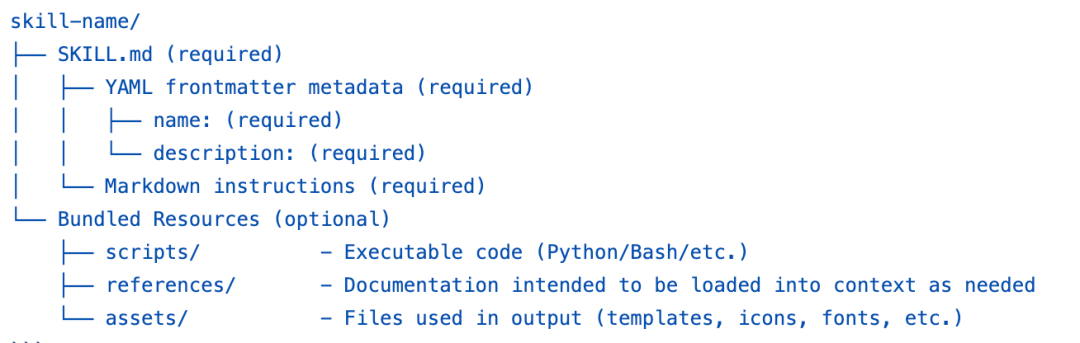
核心点在于:SKILL.md 负责告诉 Agent “什么时候用、怎么用”,scripts/ 负责把确定性步骤交给代码,references/ 提供可查阅的知识,assets/ 提供执行任务时需要的素材。这样,一个能力不再散落在 Prompt、脚本仓库、文档系统和临时文件里,而是被收拢到一个清晰的目录中。
SKILL.md 才是 Skill 的入口
每个 Skill 必须有一个 SKILL.md。它通常由两部分组成:
- YAML 元数据:描述 Skill 的名字和用途。
- Markdown 指令:描述执行任务时的步骤、约束和资源使用方式。
一个简化版 SKILL.md 可以这样写:
---
name: internal-analytics
description: Use this skill when the user asks for weekly business metrics, funnel analysis, retention analysis, or standard analytics reports based on the internal warehouse.
---

# Internal Analytics Skill

Use this skill to query the internal data warehouse and generate standard analytics reports.

## Workflow

1. Identify the requested business metric and time range.
2. Check `references/db_schema.md` for available tables and fields.
3. Use SQL only against approved analytics views.
4. Run `scripts/generate_report.py` to produce the final weekly report.
5. Use `assets/report_template.docx` as the report template.

## Rules

- Do not query raw user-identifiable data.
- Always include metric definitions from `references/metric_definitions.md`.
- If the requested metric is not defined, ask for clarification before generating SQL.
这里的 description 非常关键。它不是给人看的普通介绍,而是 Agent 做技能路由时的第一层判断依据。描述写得太宽,Agent 可能频繁误用;描述写得太窄,相关任务又可能匹配不上。
比较合理的写法是明确任务边界:
description: Use this skill when the user asks for weekly business metrics, funnel analysis, retention analysis, or standard analytics reports based on the internal warehouse.
不太适合这样写:
description: Use this skill for data analysis.
第二种描述过于泛化,几乎所有和数据有关的问题都可能命中,容易污染上下文,也会让 Agent 在不该使用该 Skill 的时候加载它。
Claude Skills 的核心机制:分层加载上下文
Agent 系统最稀缺的资源之一是上下文窗口。把所有文档、所有工具说明、所有模板和所有示例一次性塞给模型,会带来三个问题:
- 模型需要在大量无关内容里找真正有用的信息;
- 上下文成本变高,长任务更容易被历史信息挤占;
- 工具和规则越多,冲突、误用和遗忘越常见。
Claude Skills 的设计重点是分层加载。Agent 不会一开始就读取所有 Skill 的完整内容,而是按需要逐步展开。
这张图概括了 Skill 的分层加载策略:
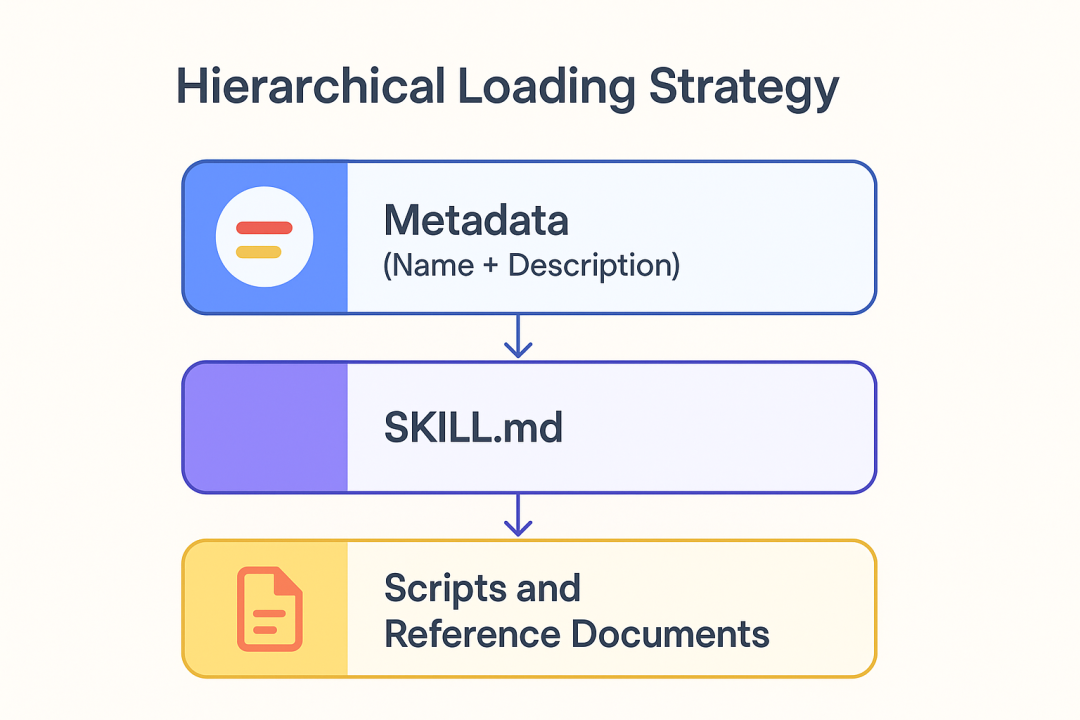
整个过程可以拆成三层。
第一层:常驻元数据
Agent 会先看到每个 Skill 的名字和描述,例如:
name: internal-analytics
description: Use this skill when the user asks for weekly business metrics...
这部分内容很短,适合常驻上下文。用户提出任务后,Agent 只需要扫描这些描述,就能初步判断哪些 Skill 可能相关。
flowchart LR
    A[用户任务] --> B[扫描 Skill 元数据]
    B --> C{是否匹配某个 Skill}
    C -- 是 --> D[加载对应 SKILL.md]
    C -- 否 --> E[按普通对话或其他工具处理]
这一层的目标不是完成任务,而是低成本路由。
第二层:加载 SKILL.md
当 Agent 判断某个 Skill 可能有用,才会读取对应的 SKILL.md。这时模型获得更详细的任务流程、规则、边界条件和资源索引。
例如用户说:
生成上一周的新用户留存分析报告。
Agent 可能根据 internal-analytics 的描述命中该 Skill,然后读取其中的执行流程:
1. Identify the requested business metric and time range.
2. Check `references/db_schema.md`.
3. Run `scripts/generate_report.py`.
4. Use `assets/report_template.docx`.
这一步相当于翻开某项任务的操作手册,而不是把整个能力库全部加载进来。
第三层:按需读取脚本、资料和素材
SKILL.md 不应该塞满所有细节。它更像索引和流程说明,真正的大块内容放在 references/、scripts/、assets/ 里,只有需要时才读取或调用。
例如:
- 需要确认表结构时,读取
references/db_schema.md; - 需要生成固定格式报告时,运行
scripts/generate_report.py; - 需要套用公司周报样式时,使用
assets/report_template.docx。
分层加载可以用一张表概括:
| 层级 | 加载内容 | 加载时机 | 上下文成本 | 主要作用 |
|---|---|---|---|---|
| 第 1 层 | name、description | 默认可见 | 低 | 判断是否可能相关 |
| 第 2 层 | SKILL.md | Skill 被选中后 | 中 | 获取任务流程和规则 |
| 第 3 层 | scripts/、references/、assets/ | 执行任务时按需使用 | 可控 | 查资料、跑脚本、套模板 |
这套机制的价值在于,它让 Agent 先用极少信息完成能力选择,再逐步获取更细的执行材料。上下文不再被大量暂时用不到的文档占满。
Skills 和 MCP 的关系
MCP(Model Context Protocol,模型上下文协议)解决的是 Agent 与外部工具、外部服务之间如何通信的问题。它规定客户端和服务端如何发现工具、描述参数、发起调用、返回结果。
Claude Skills 解决的是另一类问题:Agent 如何组织某项能力所需的知识、流程、内部脚本和资源。
二者关注点不同:
| 对比项 | Claude Skills | MCP |
|---|---|---|
| 核心定位 | 能力封装格式 | 工具通信协议 |
| 解决问题 | Agent 该如何完成某类任务 | Agent 该如何连接并调用外部工具 |
| 主要内容 | 指令、流程、脚本、参考资料、模板 | 工具描述、参数协议、调用结果 |
| 典型形态 | 本地文件夹 | 客户端与服务端通信 |
| 是否可组合 | 可以指导 Agent 使用 MCP 工具 | 可以被 Skill 中的流程调用 |
这张关系图表达了 Skills 与 MCP 的配合方式:
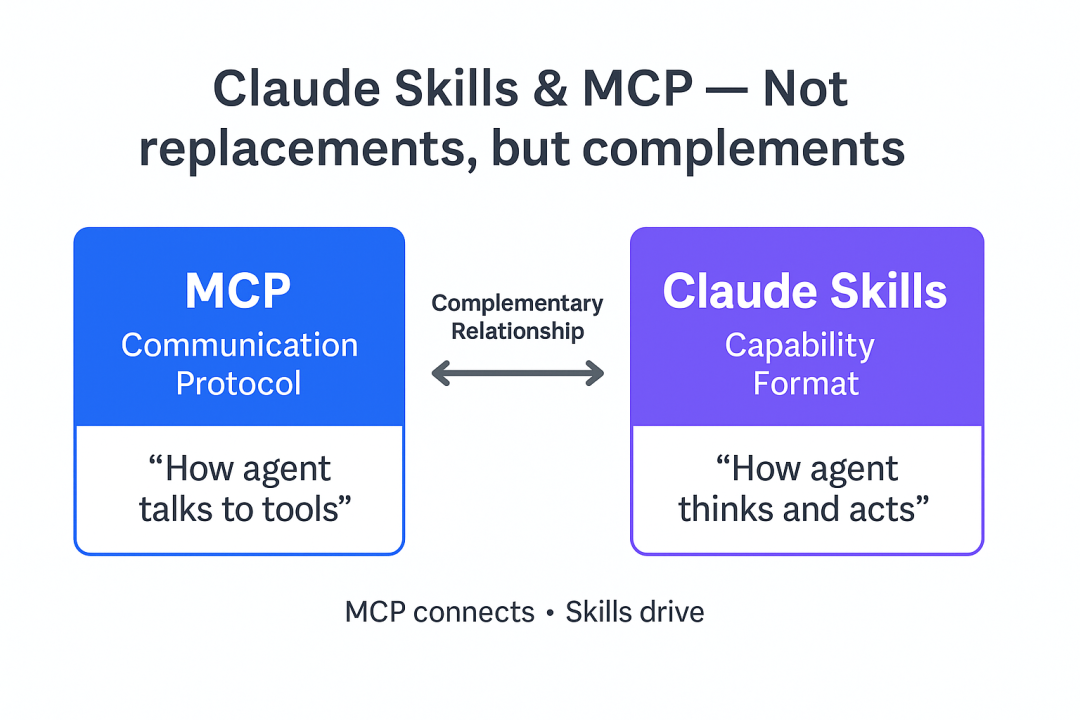
Skills 更像任务手册,MCP 更像工具接口。一个 Agent 可以先加载某个 Skill,根据里面的步骤判断需要调用哪个工具,再通过 MCP 去访问远程服务。
调用链可以表示成这样:
sequenceDiagram
    participant U as 用户
    participant A as Agent
    participant S as Skill
    participant M as MCP 服务
    participant T as 外部工具

    U->>A: 提出任务
    A->>S: 根据描述选择并加载 Skill
    S-->>A: 返回流程、规则、工具使用说明
    A->>M: 按 Skill 指令调用 MCP 工具
    M->>T: 执行外部能力
    T-->>M: 返回结果
    M-->>A: 返回结构化结果
    A-->>U: 生成最终答复或文件
因此,Skills 和 MCP 不是二选一关系。Skills 负责“应该怎样做”,MCP 负责“怎样连到工具并执行”。
为什么开发者应该关注这种设计
当 Agent 能力很少时,一个 System Prompt 加几个函数就能跑起来。例如只做天气查询、翻译、简单问答,工程复杂度不高。
一旦能力数量变多,问题会迅速出现:
- System Prompt 越写越长,改一个规则可能影响多个任务;
- 工具函数混在一个大文件里,很难知道哪个任务依赖哪个工具;
- 业务文档散落在不同位置,Agent 经常拿不到最新版本;
- 不同团队各写各的 Prompt,能力难复用;
- 测试困难,因为一项能力没有明确边界。
Skills 提供的启发是:把 Agent 能力拆成可独立维护、可独立测试、可独立版本控制的模块。
可以把一个 Agent 系统想象成这样:
flowchart TB
    A[Agent Runtime] --> B[Skill Registry]
    B --> C[analytics-skill]
    B --> D[pdf-processing-skill]
    B --> E[presentation-skill]
    B --> F[customer-support-skill]

    C --> C1[SKILL.md]
    C --> C2[scripts/]
    C --> C3[references/]
    C --> C4[assets/]
运行时只需要维护一个 Skill Registry,用来记录有哪些 Skill、每个 Skill 的描述是什么、文件在哪里。当任务到来时,Agent 根据元数据选择技能,再按需加载完整内容。
这种模式的好处很具体:
| 问题 | 用 Skill 方式后的变化 |
|---|---|
| Prompt 过长 | 每个任务只加载相关 Skill |
| 工具说明混乱 | 工具说明跟对应任务放在同一个目录 |
| 业务知识难更新 | 修改 references/ 即可更新参考资料 |
| 能力难复用 | 一个 Skill 可以被多个 Agent 使用 |
| 难测试 | 可以围绕单个 Skill 写测试用例 |
| 难回滚 | Skill 文件夹可以独立版本控制 |
一个内部数据分析 Skill 示例
假设要让 Agent 生成公司内部周报,可以创建一个名为 internal-analytics-skill 的能力包。
目录结构:
internal-analytics-skill/
├── SKILL.md
├── scripts/
│   ├── run_query.py
│   └── generate_report.py
├── references/
│   ├── db_schema.md
│   ├── metric_definitions.md
│   └── report_rules.md
└── assets/
    └── weekly_report_template.docx
references/db_schema.md 可以存放允许查询的数据视图:
# Analytics Views

## dim_user
- user_id_hash: hashed user identifier
- signup_date: date of registration
- channel: acquisition channel

## fact_user_activity
- user_id_hash: hashed user identifier
- activity_date: activity date
- event_type: login, purchase, share, comment

## agg_daily_metrics
- metric_date
- new_users
- active_users
- paying_users
- revenue
references/metric_definitions.md 可以约束指标口径:
# Metric Definitions

## New Users
Users whose signup_date falls within the selected date range.

## Day-7 Retention
Among users who signed up on day D, the percentage that had any activity on D+7.

## Paying Users
Users with at least one successful payment event in the selected date range.
SKILL.md 负责把流程串起来:
---
name: internal-analytics
description: Use this skill for standard internal analytics reports, including weekly metrics, funnel analysis, retention analysis, and business review reports.
---

# Internal Analytics Skill

## Workflow

1. Identify report type, date range, and requested metrics.
2. Read `references/metric_definitions.md` to confirm metric definitions.
3. Read `references/db_schema.md` before generating SQL.
4. Use only aggregate views unless the user explicitly has permission for detailed analysis.
5. Execute SQL through `scripts/run_query.py`.
6. Generate the final report with `scripts/generate_report.py`.
7. Apply `assets/weekly_report_template.docx` for Word output.

## Safety Rules

- Do not output raw user-level records.
- Do not infer undocumented metric definitions.
- If a metric is ambiguous, ask for clarification.
- Include SQL and metric definitions in the appendix.
脚本负责做确定性工作,例如生成报告:
# scripts/generate_report.py
from pathlib import Path
from datetime import date

def generate_weekly_report(metrics: dict, output_path: str) -> None:
    """
    Generate a standard weekly analytics report.

    metrics example:
    {
        "new_users": 12500,
        "active_users": 83400,
        "day_7_retention": "31.2%",
        "revenue": 962000
    }
    """
    lines = [
        "# Weekly Analytics Report",
        "",
        f"Generated at: {date.today().isoformat()}",
        "",
        "## Core Metrics",
    ]

    for key, value in metrics.items():
        lines.append(f"- {key}: {value}")

    Path(output_path).write_text("\n".join(lines), encoding="utf-8")
用户提出:
帮我生成上周的新用户、活跃用户和 7 日留存周报。
Agent 的执行过程会变成:
flowchart TD
    A[用户请求生成周报] --> B[匹配 internal-analytics Skill]
    B --> C[读取 SKILL.md]
    C --> D[确认指标和时间范围]
    D --> E[读取指标定义和表结构]
    E --> F[生成 SQL]
    F --> G[调用 run_query.py]
    G --> H[调用 generate_report.py]
    H --> I[套用周报模板并输出结果]
这样,新 Agent 接入时不需要重新训练模型,也不需要复制一大段 Prompt。只要运行环境能发现并加载这个 Skill,它就能按同一套流程处理内部数据分析任务。
自研 Agent 如何借鉴 Skills 模式
即使不使用 Claude,也可以实现类似机制。关键不在于文件夹名字,而在于四个组件:
- Skill Registry:记录所有 Skill 的元数据。
- Skill Loader:按需读取
SKILL.md、参考资料和资源。 - Tool Executor:安全执行
scripts/或外部工具。 - Runtime Policy:控制权限、日志、沙箱和上下文预算。
一个极简实现思路如下:
from dataclasses import dataclass
from pathlib import Path
import yaml

@dataclass
class SkillMeta:
    name: str
    description: str
    path: Path

def load_skill_meta(skill_dir: Path) -> SkillMeta:
    skill_file = skill_dir / "SKILL.md"
    text = skill_file.read_text(encoding="utf-8")

    # 简化处理:假设文件以 YAML front matter 开头
    _, yaml_block, _ = text.split("---", 2)
    meta = yaml.safe_load(yaml_block)

    return SkillMeta(
        name=meta["name"],
        description=meta["description"],
        path=skill_dir,
    )

def discover_skills(root: str) -> list[SkillMeta]:
    root_path = Path(root)
    skills = []

    for child in root_path.iterdir():
        if child.is_dir() and (child / "SKILL.md").exists():
            skills.append(load_skill_meta(child))

    return skills
技能选择可以先用简单规则实现:
def select_skill(user_task: str, skills: list[SkillMeta]) -> SkillMeta | None:
    task = user_task.lower()

    for skill in skills:
        desc = skill.description.lower()
        keywords = [w for w in desc.replace(",", " ").split() if len(w) > 4]

        if any(keyword in task for keyword in keywords):
            return skill

    return None
实际生产系统里,可以用向量检索、分类模型、LLM 路由器或多策略组合来选择 Skill。无论选择方式如何,核心原则都是一致的:先看短描述,命中后再加载完整内容。
适合使用 Skills 的场景
Skills 适合那些流程相对稳定、资料有明确边界、需要重复执行的任务。
| 场景 | 是否适合 | 原因 |
|---|---|---|
| 固定格式报告生成 | 适合 | 有明确模板、指标口径和输出结构 |
| PDF 表单处理 | 适合 | 可把字段解析、填充、校验交给脚本 |
| 内部知识库问答 | 适合 | 可把政策、Schema、API 文档放入 references/ |
| PPT 或文档生成 | 适合 | 可把模板、Logo、样式资源放入 assets/ |
| 代码仓库脚手架生成 | 适合 | 可把项目模板和编码规范打包 |
| 开放式闲聊 | 不太适合 | 没有固定流程,也不需要专门资源 |
| 高实时性交易决策 | 需要谨慎 | 需要额外权限控制、审计和风控 |
| 强依赖个人偏好的创作任务 | 部分适合 | 可以封装格式规范,但审美判断仍依赖模型 |
判断一个任务是否适合做成 Skill,可以问三个问题:
- 这个任务是否会被重复执行?
- 是否存在稳定的流程、规则或模板?
- 是否有专门的脚本、资料或资源需要随任务一起管理?
如果三个问题大多为“是”,就适合拆成 Skill。
常见设计问题
description 写得过于宽泛
描述决定了 Skill 是否会被加载。过于宽泛的描述会让 Agent 在不相关任务中误用 Skill。
不推荐:
description: Use this skill for documents.
更合适:
description: Use this skill when filling, validating, or extracting fields from structured PDF forms.
把所有资料都塞进 SKILL.md
SKILL.md 应该是流程说明和资源索引,不应该成为超长知识库。大段 API 文档、数据库表结构、业务规则应放到 references/,执行时按需读取。
合理分工是:
SKILL.md                  # 任务流程、规则、资源索引
references/api.md         # API 细节
references/schema.md      # 数据结构
references/policy.md      # 业务政策
脚本没有沙箱和权限控制
scripts/ 里的代码可能访问文件系统、网络、数据库或内部服务。生产环境不能让 Agent 随意执行脚本,需要加上权限边界:
| 风险 | 控制方式 |
|---|---|
| 读取敏感文件 | 限制工作目录和文件白名单 |
| 访问内部网络 | 配置网络访问策略 |
| 执行危险命令 | 禁止 shell 注入,使用参数化调用 |
| 输出敏感数据 | 增加结果过滤和审计日志 |
| 脚本版本不一致 | 固定依赖版本并纳入 CI 测试 |
参考资料没有版本管理
Agent 使用旧 Schema 生成 SQL,或者按过期指标口径写报告,结果会直接出错。references/ 应与代码一样进入版本控制,并在 Skill 中标明适用范围。
例如:
## Version

- Metric definition version: 2026-05
- Warehouse schema version: analytics-v3
- Owner: data-platform-team
缺少测试样例
Skill 不只是 Prompt,也是一种可测试资产。每个 Skill 至少应该有几组输入输出样例,用来验证路由、流程和工具调用是否符合预期。
可以建立这样的目录:
internal-analytics-skill/
├── SKILL.md
├── scripts/
├── references/
├── assets/
└── tests/
    ├── weekly_report_case.md
    ├── retention_case.md
    └── invalid_metric_case.md
测试样例可以描述:
# Test Case: invalid_metric_case

## User Request
Generate a weekly report with happiness score.

## Expected Behavior
The Agent should ask for clarification because "happiness score" is not defined in `references/metric_definitions.md`.
Skills 的本质
Claude Skills 的重点不是“又多了一个 Agent 概念”,而是把 Agent 能力工程化:
- 用
description做低成本能力路由; - 用
SKILL.md固化任务流程和规则; - 用
scripts/承接确定性执行; - 用
references/管理专业知识; - 用
assets/管理任务资源; - 用分层加载减少上下文浪费。
模型决定 Agent 能力上限,工程结构决定这些能力能否稳定复用。Skills 的价值就在这里:它把“让 Agent 会做某件事”从一段难维护的 Prompt,拆成了一个可组织、可测试、可迭代的能力包。